Contact support

How much volume trades during the session?

Session volume is the recorded number of contracts traded during the configured session. This distribution groups session totals into intervals so you can see how often a market traded within a volume band.

Count sessions within a volume band

In the Statistics Library, open Session volume distribution. This lookup requires MarketStats Pro access to the selected market.
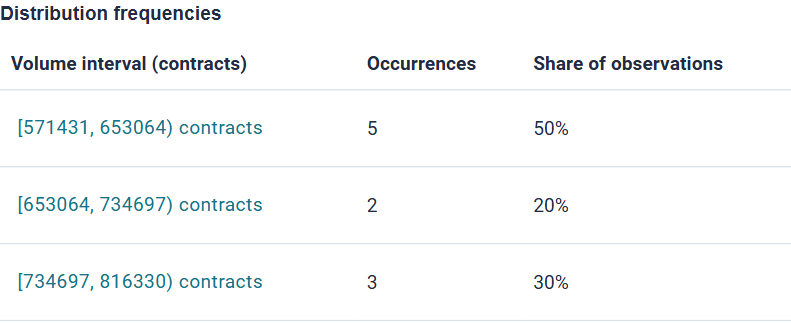
  1. Choose the market and dates, then open Table view.
  2. Find the interval in Volume interval (contracts). The lower bound is included and the upper bound is excluded.
  3. For a cutoff on an interval boundary, add the shares of the intervals that meet it. If the cutoff falls inside an interval, the grouped table does not give an exact count on each side.
Session volume table showing 50%, 20% and 30% of observations in three adjacent contract intervals.
Illustrative ES sample. Two of ten observations were in [653,064, 734,697) contracts and three were in the next band. Five of ten reached at least 653,064 contracts.

How do I locate the busy part of the session?

The daily total combines the entire configured session. To see which time windows accounted for more activity, open the volume heatmap and compare its Average row across the session.

Read a distribution