Contact support

Compare strategy variants

Use the earlier development results to compare two locked versions of a hypothesis. This view lets you inspect a rule change while keeping the later test closed.
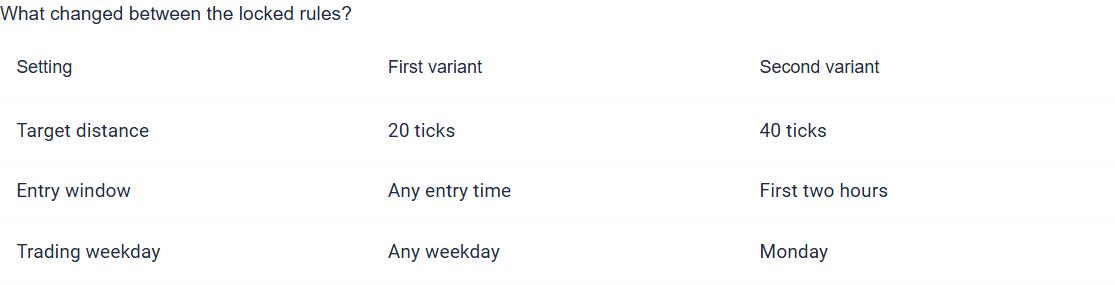
Locked-rule comparison listing target distance, entry window and trading weekday.
In this example three rules changed. The results cannot isolate the effect of target distance alone.

Choose two comparable variants

  1. In Strategy Hypothesis, lock the original rule. Create a second version with one change, such as a weekday filter, entry-time restriction, adverse entry gap limit, trade limit or target distance.
  2. Open Private strategy variant history. Choose the First variant and Second variant from the same market and development window with a compatible source revision. Select Compare earlier periods.
  3. Read What changed between the locked rules? Check the two columns before attributing a difference to one setting.

Read the second variant against the first

The comparison shows the change in hypothetical entries, target-first percentage points and expectancy after costs. In the after-cost outcome table, each share uses that variant’s resolved exits, including scheduled exits.

A weekday filter can leave a subset of the original entries. A new entry time can change which price starts the trade. Keep the eligible counts with the rates and identify shared settings when you record the result.