Contact support

Plan a session and choose a checkpoint

Use a session plan to record which study you intend to review, for which market and at what point in the session. The saved study supplies the market.
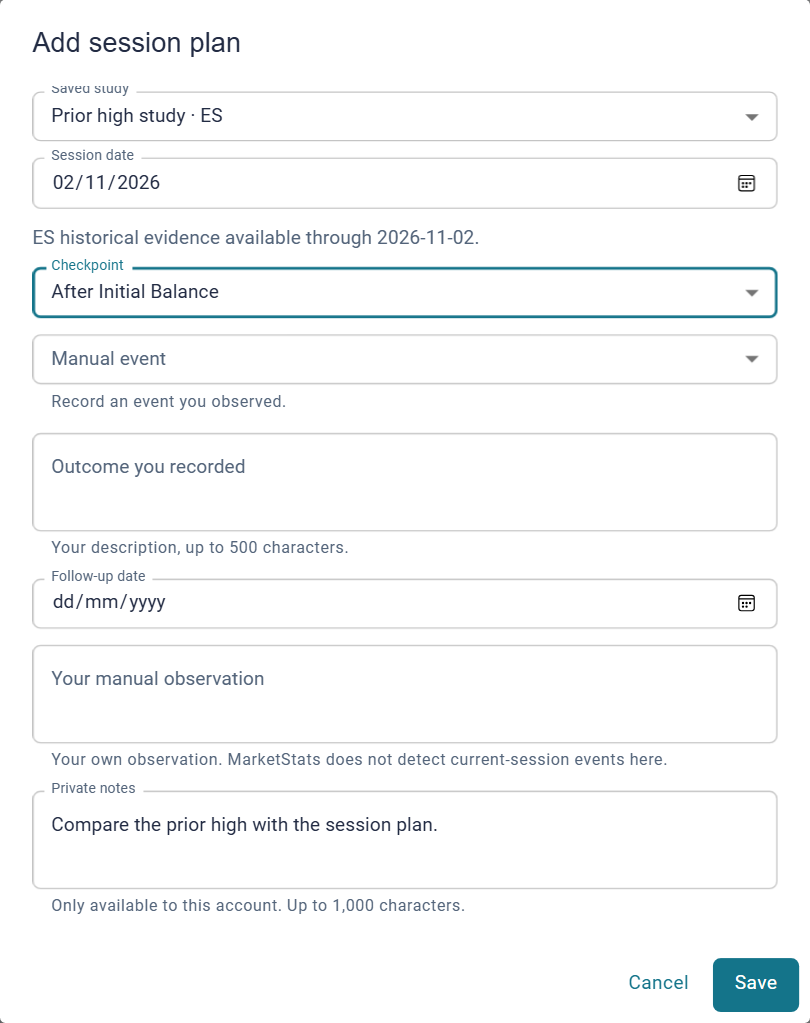
Add the plan

  1. In My Playbooks, find your playbook and select Add session plan.
  2. Choose the Saved study and check its market. Enter the trading date under Session date. The evidence date below the selector tells you how far the stored history extends.
  3. Choose a Checkpoint. Use Before the open to prepare, After Opening Range or After Initial Balance to review a formed range, or After the close to review the completed session.
  4. Select Save. Check the date, market and checkpoint at the top of the new entry.
Add session plan with an ES study selected for 2 November and After Initial Balance selected.
The session date belongs to the plan. The evidence date belongs to the market history.

Record what you see at the checkpoint

Open Edit session plan. Choose a Manual event or type what you saw in Your manual observation. Select Save. MarketStats stores these as your own observations.

For example, record an Initial Balance high break at After Initial Balance. When earlier history is available, Open historical return study lets you examine returns inside that range during the next 30 minutes on earlier sessions.